Monday, October 15, 2018
Usefull links in SharePoint
User list detail view
view all users in site
modify view
http://XXXX/_layouts/15/start.aspx#/_catalogs/users/detail.aspx

Thursday, August 16, 2018
SharePoint 2016 Register-SPWorkflowService Status code = 500
საკმაოდ ჩახლართული ამბავი გამოდგა workflow 2013 -ის ინსტალაცია. უამრავ ერრორს შორის:
Register-SPWorkflowService Status code = 500 შეცდომამ გამაწვალა რომლის გადაწყვეტა შემდეგნაირად გამოვიდა:
1. ინსტალაციის დროს ბაზის own-er წერს dbo შევცვალე ჯერ owner - sa
შემდეგ კი გაუწერე შესაბამისი ექაუნთ ს სახელი მაგალითად :
domeni\spadmin - სქემა მიენიჭა db_owner რასაც წესით სწორი აუტენტიფიკაცია უნდა გაეშვა ანუ pool->მიმარტავს spadmin-ით იქ ხვდება რისი უფლება აქვს. 2 ბაზაზე გავწერე, ბაზის სახელები ავიღე Workflow Management Site config ფაილიდან (ვინაიდან ბევრი ცდის შემდეგ უამრავი ბაზა შეიქმნა მიმდინარეს აღმოჩენის გზა ვერ მოვიფიქრე სხვა)
2. გაუშვი შემდეგი ბრძანება : appcmd.exe set config "Workflow Management Site" –section:system.webServer/security/authentication/windowsAuthentication /useAppPoolCredentials:"True" /commit:apphost
ჯერ შევცვალ მისმართი (cd C:\Windows\SysWOW64\inetsrv) და შემდეგ მიუწერე .\
3. შევცვალე მისამართი საიტის რეგისტრაციისა ანუ მიუთითე უშუალოდ სერვერის მისამართი:
Register-SPWorkflowService -SPSite “http://corps.ტესტ.ge” -WorkflowHostUri “http://SGP-SMS-APP:12291” –AllowOAuthHttp –Force
ვინაიდან აპლიკაციის სერევერის მისამართი სხვა იყო, იქედან გაშვებული რეგისტრაციის მისმართი შესაბამისად შეიცვალა შემდეგით:
Register-SPWorkflowService -SPSite “http://corps.ტესტ.ge” -WorkflowHostUri “http://SGP-SMS-WEB:12291” –AllowOAuthHttp –Force
4. გავთიშე IIS ში Workflow Management Site ისთვის ASP.NET impersonate ->Disable
და .. გაეშვა..
Wednesday, August 8, 2018
SharePoint Designer 2013: The server could not complete your request. For more specific information, click the Details below
I found this issue in SharePoint Designer 2013 when accessing your SharePoint sites.
It will pops up below message box repeatedly until I force to kill the SPDESIGN.EXE from the Task Manager. The message “The server could not complete your request. For more specific information, click the Details button.” is very vague and does NOT tell you what is the root of error.
1. Enable Anonymous access in IIS for you Default SharePoint site and
2. in bindings don't forgot to delete additional binding if any.
Sunday, December 7, 2014
SharePoint online - office365 - 01
/NewForm.aspx?toolpaneview=2# - ბმული ახალი აითემის გვერდის რედაქტირებისთვის
ლისტზე ატტაჩმენტის ველის აუცილებლობის დამატება:
ლისტზე ატტაჩმენტის ველის აუცილებლობის დამატება:
<script type="text/javascript" language="javascript">
function PreSaveAction() {

         var elm = document.getElementById("idAttachmentsTable");
         if (elm == null || elm.rows.length == 0)
{
             document.getElementById("idAttachmentsRow").style.display='none';

alert("Please attach Documents");
return false ;
}
else { return true ;}
}
</script>
<a onclick="UploadAttachment();" href="javascript:void(0)" id="ctl00_ctl43_g_783b963e_f8e1_4aaf_a935_7eca679a18ae_ctl00_ctl01_ctl00_toolBarTbl_RptControls_diidIOAttach">Upload CV</a>
SharePoint 2013 on Office 365 vs Standard Intranet SharePoint 2013
ჯერ მინდა ავღწერო SharePoint 2013 on Office 365
1. ხელმისაწვდომობა - ფასები
2. სიჩქარე მუშაობის კომფორტი
ამ პუნქტთან დაკავშირებით მინდა ვთქვა საკმაოდ ძნელია მუშაობა, მაგალითად, წეთი workflow დაპაბლიშება-გატესტვაში მიდის დაახლოებით 5 წთ. მოგეხსენებათ რამდენი ვერსიის გატესტვა გიწევს ვიდრე სასურველ შედეგს მიაღწევ..
3. შესაძლებლობები/ შეზღუდვები
Standard Intranet SharePoint 2013
1. ხელმისაწვდომობა - ფასები
2. სიჩქარე მუშაობის კომფორტი
3. შესაძლებლობები/ შეზღუდვები
პირველი რაც საჭირო გახდა, App store ის გამოყენებისთვის ცალკე დომეინის აწევა, რამდენად გამოვა, როდესაც აბსოლუტურად რემოუთად მუშაობ არ ვიცი..
კარგი სტატია ვიპოვე გავყვები შედეგებს დავწერ :
http://sharepointchick.com/archive/2012/07/29/setting-up-your-app-domain-for-sharepoint-2013.aspx
სულ მაოცებს, რატომ ჩნდება კარგი პოსტები msdn ის გარეთ, და ძალიან იშვიათად თუ გვადეგება Microsoft-ის ეს რესურსი, არამედ, წერს უბრალო კეთილი ხალხი გასაგებ ენაზე და იყენებს შემდეგ თვითომ Microsoft-ის თანამშრომლები.
მოკლედ ლირიული გადახვევის შემდეგ, ვაყენებ დომეინ სერვერს app ს ასაწევად.
უმნო: The most important change in SharePoint 2013 for developers is the introduction of SharePoint apps. An app for SharePoint is a small and isolated application that provides a specific bit of functionality. SharePoint apps can and have to be added to or removed from a site by the site owner. Apps have their own, isolated URLs, which are separate from the URLs of the sites where the app is being deployed to and where the app is being used. In order to provide isolation apps run in their own domain, instead of in the same domain name as your farm. Using a different domain name for apps helps prevent cross-site scripting between apps and SharePoint sites.
სამწუხაროდ, აპპ სერვერი ვერ ავაწყვე, მოითხოვა ლიცენზიები და ა.შ. როდესაც არც დომენზე არც შეარპოინტზე არაა შესყიდული ლიცენზია :(
1. ხელმისაწვდომობა - ფასები
2. სიჩქარე მუშაობის კომფორტი
ამ პუნქტთან დაკავშირებით მინდა ვთქვა საკმაოდ ძნელია მუშაობა, მაგალითად, წეთი workflow დაპაბლიშება-გატესტვაში მიდის დაახლოებით 5 წთ. მოგეხსენებათ რამდენი ვერსიის გატესტვა გიწევს ვიდრე სასურველ შედეგს მიაღწევ..
3. შესაძლებლობები/ შეზღუდვები
Standard Intranet SharePoint 2013
1. ხელმისაწვდომობა - ფასები
2. სიჩქარე მუშაობის კომფორტი
3. შესაძლებლობები/ შეზღუდვები
პირველი რაც საჭირო გახდა, App store ის გამოყენებისთვის ცალკე დომეინის აწევა, რამდენად გამოვა, როდესაც აბსოლუტურად რემოუთად მუშაობ არ ვიცი..
კარგი სტატია ვიპოვე გავყვები შედეგებს დავწერ :
http://sharepointchick.com/archive/2012/07/29/setting-up-your-app-domain-for-sharepoint-2013.aspx
სულ მაოცებს, რატომ ჩნდება კარგი პოსტები msdn ის გარეთ, და ძალიან იშვიათად თუ გვადეგება Microsoft-ის ეს რესურსი, არამედ, წერს უბრალო კეთილი ხალხი გასაგებ ენაზე და იყენებს შემდეგ თვითომ Microsoft-ის თანამშრომლები.
მოკლედ ლირიული გადახვევის შემდეგ, ვაყენებ დომეინ სერვერს app ს ასაწევად.
უმნო: The most important change in SharePoint 2013 for developers is the introduction of SharePoint apps. An app for SharePoint is a small and isolated application that provides a specific bit of functionality. SharePoint apps can and have to be added to or removed from a site by the site owner. Apps have their own, isolated URLs, which are separate from the URLs of the sites where the app is being deployed to and where the app is being used. In order to provide isolation apps run in their own domain, instead of in the same domain name as your farm. Using a different domain name for apps helps prevent cross-site scripting between apps and SharePoint sites.
სამწუხაროდ, აპპ სერვერი ვერ ავაწყვე, მოითხოვა ლიცენზიები და ა.შ. როდესაც არც დომენზე არც შეარპოინტზე არაა შესყიდული ლიცენზია :(
Sunday, January 19, 2014
eval - ფუნქცია repeting table list merge
როდესაც შემოგვაქვს secondary connection ფორმაში, და გვინდა ველებისთვის concat ფუნქციის გამოყენება ვიყენებთ შემდეგ ფორმულირებას:
eval(eval(SharePointListItem_RW, 'concat("@", d:ID[../d:SoldNumber = 1], ";")'), "..")
1. 'concat("@", d:ID[../d:SoldNumber = 1], ";")' - აეთიანებს @ დაფილტრულ ველს(აუცილებლად მისათითებელია ველი xფორმატში -პირდაპირ არჩეულს ვერ ხედავს) და ";" - გამოგვდის კონსტრუქცია, რომლის დაფილტვრაც შესაძლებელია შემდეგი პროცესის აღძვრისათვის.
2. eval(SharePointListItem_RW, 'concat("@", d:ID[../d:SoldNumber = 1], ";")') - ჩამოუბენს repeating ლისტს, და აკრიფავს შესაბამის ID ებს.
3. eval(SharePointListItem_RW, 'concat("@", d:ID[../d:SoldNumber = 1], ";")') - გარდაქმნის სტრინგად.
eval(eval(SharePointListItem_RW, 'concat("@", d:ID[../d:SoldNumber = 1], ";")'), "..")
1. 'concat("@", d:ID[../d:SoldNumber = 1], ";")' - აეთიანებს @ დაფილტრულ ველს(აუცილებლად მისათითებელია ველი xფორმატში -პირდაპირ არჩეულს ვერ ხედავს) და ";" - გამოგვდის კონსტრუქცია, რომლის დაფილტვრაც შესაძლებელია შემდეგი პროცესის აღძვრისათვის.
2. eval(SharePointListItem_RW, 'concat("@", d:ID[../d:SoldNumber = 1], ";")') - ჩამოუბენს repeating ლისტს, და აკრიფავს შესაბამის ID ებს.
3. eval(SharePointListItem_RW, 'concat("@", d:ID[../d:SoldNumber = 1], ";")') - გარდაქმნის სტრინგად.
InfoPath: Lookup with formatted dates is possible
SharePoint 2010 & InfoPath: Lookup with formatted dates is possible
I created a dataconnection to the calendar list, then i added a dropdown to my form and choose the dataconnection as source. I set the filter to starting date (Event Date) to greater than today and the result does not make me smile:

Can anyone tell me why the output is so unpretty? I expected to get a format like 17.05.2012 13:00:00. Anyway why can’t i tell the dropdown how to format the values? I can’t show this my client and tell him “Well that’s SharePoint o InfoPath”. So i tried it several things till i came to the desired solution.
The source is the source
That’s true for this. At first you have to create a calculated column in your calendar list with this formular:
=TEXT([ColumnName],”dd.mm.yyy hh:mm”)
Remember that english / german might need other formulas like a semicolon instead of a commata or at the date format.
After that i updated my data connection in the form and added the new column. Now i can choose that the new column should be the display column in my lookup and it will display the values like i wanted:

Great, it is possible with a little trick with standard features, but it surprised me that i had to use this workaround.
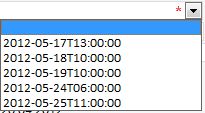
Can anyone tell me why the output is so unpretty? I expected to get a format like 17.05.2012 13:00:00. Anyway why can’t i tell the dropdown how to format the values? I can’t show this my client and tell him “Well that’s SharePoint o InfoPath”. So i tried it several things till i came to the desired solution.
The source is the source
That’s true for this. At first you have to create a calculated column in your calendar list with this formular:
=TEXT([ColumnName],”dd.mm.yyy hh:mm”)
Remember that english / german might need other formulas like a semicolon instead of a commata or at the date format.
After that i updated my data connection in the form and added the new column. Now i can choose that the new column should be the display column in my lookup and it will display the values like i wanted:
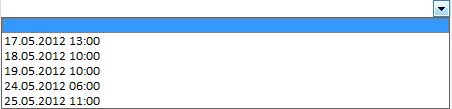
Great, it is possible with a little trick with standard features, but it surprised me that i had to use this workaround.
Subscribe to:
Posts (Atom)