Sunday, January 19, 2014

InfoPath: Lookup with formatted dates is possible


SharePoint 2010 & InfoPath: Lookup with formatted dates is possible

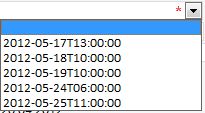
I created a dataconnection to the calendar list, then i added a dropdown to my form and choose the dataconnection as source. I set the filter to starting date (Event Date) to greater than today and the result does not make me smile:

Can anyone tell me why the output is so unpretty? I expected to get a format like 17.05.2012 13:00:00. Anyway why can’t i tell the dropdown how to format the values? I can’t show this my client and tell him “Well that’s SharePoint o InfoPath”. So i tried it several things till i came to the desired solution.
The source is the source
That’s true for this. At first you have to create a calculated column in your calendar list with this formular:
=TEXT([ColumnName],”dd.mm.yyy hh:mm”)
Remember that english / german might need other formulas like a semicolon instead of a commata or at the date format.
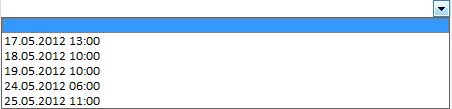
After that i updated my data connection in the form and added the new column. Now i can choose that the new column should be the display column in my lookup and it will display the values like i wanted:

Great, it is possible with a little trick with standard features, but it surprised me that i had to use this workaround.

Monday, January 13, 2014

SharePoint 2010 & InfoPath: Lookup with formatted dates is possible


I am sure this post is not really new, but i would like to share some thoughts with you. I had to create a InfoPath fom which contains a lookup / dropdown to another SharePoint list – a calendar. In the lookup there should be all the starting times of the calendar which are greater than today. No Problem with the filtering possibility in InfoPath.
I created a dataconnection to the calendar list, then i added a dropdown to my form and choose the dataconnection as source. I set the filter to starting date (Event Date) to greater than today and the result does not make me smile:

Can anyone tell me why the output is so unpretty? I expected to get a format like 17.05.2012 13:00:00. Anyway why can’t i tell the dropdown how to format the values? I can’t show this my client and tell him “Well that’s SharePoint o InfoPath”. So i tried it several things till i came to the desired solution.
The source is the source
That’s true for this. At first you have to create a calculated column in your calendar list with this formular:
=TEXT([ColumnName],”dd.mm.yyy hh:mm”)
Remember that english / german might need other formulas like a semicolon instead of a commata or at the date format.
After that i updated my data connection in the form and added the new column. Now i can choose that the new column should be the display column in my lookup and it will display the values like i wanted:

Great, it is possible with a little trick with standard features, but it surprised me that i had to use this workaround.

Thursday, December 12, 2013

SharePoint 2013 - 0st step (ინსტალაცია)

ინსტალაციის პროცესი საკმაოდ მტკივნეული თემაა ამ პროდუქტისთვის,
გასაკუთრებით როდესაც ვაყენებთ server 2012 ზე..

დღეს აღმოვაჩინე ინსტალაციის დროს წამოჭრილი პრობლემების ჩანაწერი და მისი გადაწყვეტის გზები, კერძოდ:

  1. როდესაც გამოდის შეცდომა prerequertis ინსტალაციის დროს, ვცადე შემდეგი ხერხები:
  2. შედეგი არ ქონდა


So the answer was:

domain group policy default applies a restriction on PowerShell to allsigned that cannot be overridden by the usual Set-ExecutionPolicy Unrestricted.

Changed the policy (Computer Configuration/Administrative Templates/Windows Components/Windows 
PowerShell : Turn on Script Execution to Allow all scripts

Ran the prerequisite installer successfully.


Monday, November 4, 2013

SharePoint 2013 - 1st step

როგორც აღმოჩნდა, ადმინისტრირების ნაწილში, ისევ პრობლემებია..

არსად არაა ზუსტი დირექტივა იმისა რომ Powershell, ბროუზერი სერვერზე უნდა გაიხსნას ადმინისტრატორით Run as Administrator ფუნქცით, სხვა შემთხვევაში სისტემული ექაუნთის მიუხედავად არ გვაძლევს ფარმის "ადმინისტრირების" უფლებას

Distributed Cache Service does not support this operation from Central Administration. Please use Sharepoint Powershell commandlets. - ექქაუნთის ცვლილებისთვის კვლავ ცუმპა ცუმპა უნდა..

$farm = Get-SPFarm
$cacheService = $farm.Services | where {$_.Name -eq "AppFabricCachingService"}
$accnt = Get-SPManagedAccount -Identity დომენი\სერვისის_მომხმარებელი
$cacheService.ProcessIdentity.CurrentIdentityType = "SpecificUser"
$cacheService.ProcessIdentity.ManagedAccount = $accnt
$cacheService.ProcessIdentity.Update()

$cacheService.ProcessIdentity.Deploy()

...და...
სხვა შეცდომები:

2. MissingWebPart
ამის გასასწორებლად:


[MissingWebPart] WebPart class [28c23aec-2537-68b3-43b6-845b13cea19f] is referenced [5] times in the database [SharePoint_AdminContent_396b143d-21be-4f28-a836-086448661e8f], but is not installed on the current farm. Please install any feature/solution which contains this web part. One or more web parts are referenced in the database [SharePoint_AdminContent_396b143d-21be-4f28-a836-086448661e8f], but are not installed on the current farm. Please install any feature or solution which contains these web parts.

ბაზაში უშვებთ პროცედურას:
use [SharePoint_AdminContent_396b143d-21be-4f28-a836-086448661e8f]
select DirName, LeafName
    from dbo.AllDocs
    where id in
        (select tp_PageUrlID
            from dbo.AllWebParts
            where lower(tp_WebPartTypeId) = '28c23aec-2537-68b3-43b6-845b13cea19f')

და გადავდივართ ამ ლინკებზე შესაბამისად:
http://[centraladmin:port]/SearchAdministration.aspx
http://[centraladmin:port]/SearchFarmDashBoard.aspx
მიუხედავად ერორებისა, ეს გევრდები არაა კონფიგურირებული ჯერ, მაგრამ გვერდის მისამართის ვიზიტის შემდეგ შეცდომა ქრება პანელიდან.

მნიშვნელოვანი ბმულები Sharepoint

Base Site URLs:
• http://learnsouth/
• http://learnsouth/Media/
• http://learnsouth/Revisions/
• http://learnsouth/Schools/
• http://learnsouth/Schools/SchoolA/
• http://learnsouth/Schools/SchoolB/
• http://learnsouth/Schools/SchoolC/

SharePoint Site Common URL Extensions
*Note: Append the following URLs to base site URLs
Main Site Content
• Home Page
o /default.aspx
o /Pages/default.aspx
• Site Settings
o /_layouts/settings.aspx
• All Site Content
o /_layouts/viewlsts.aspx
• Mobile All Site Content
o /_layouts/mobile/mbllists.aspx
• Shared Documents
o /shared documents/forms/allitems.aspx
• Manage Site Content and Structure
o /_layouts/sitemanager.aspx
• Site Content and Structure Logs
o /_Layouts/SiteManager.aspx?lro=all
• Site Hierarchy Administration (only available at top level site)
o /_layouts/vsubwebs.aspx
• Manage Sites and Workspaces
o /_layouts/mngsubwebs.aspx
• Pages
o /Pages/Forms/AllItems.aspx
• Page Settings
o /_layouts/PageSettings.aspx
• Site Libraries and Lists
o /_layouts/mcontent.aspx
• Site Recycle Bin
o /_layouts/AdminRecycleBin.aspx
• Recycle Bin
o /_layouts/recyclebin.aspx
• Help
o /_layouts/help.aspx
User Administration
• Users and Groups
o /_layouts/people.aspx
o /_layouts/people.aspx?MembershipGroupId=0
o /_layouts/groups.aspx
o /_layouts/user.aspx
o /_layouts/role.aspx
• User Display
o /_layouts/userdisp.aspx
o /_layouts/userdisp.aspx?ID=1


• User Edit
o /_layouts/useredit.aspx
o /_layouts/useredit.aspx?ID=1&Source=%2F%5Flayouts%2Fpeople%2Easpx
• Add User
o /_layouts/aclinv.aspx
• Search AD
o /_layouts/picker.aspx
• New Group
o /_layouts/newgrp.aspx
Site Administration
• Create (General)
o /_layouts/create.aspx
• Create New SharePoint SubSite
o /_layouts/newsbweb.aspx
• New basic page
o /_layouts/bpcf.aspx
• Site Directory Settings
o /_layouts/SiteDirectorySettings.aspx
• Site Collection Policies
o /_layouts/Policylist.aspx
• Site Features
o /_layouts/ManageFeatures.aspx
• Site Collection Features
o /_layouts/ManageFeatures.aspx?Scope=Site
• Add/Remove Site Collection Administrators
o /_layouts/mngsiteadmin.aspx
• Storage Space Allocation Management
o /_layouts/storman.aspx
• Site Collection Workflows
o /_layouts/wrkmng.aspx
Forms
• List Edit
o /_layouts/listedit.aspx
• Forms
o /Forms/DispForm.aspx
o /Forms/EditForm.aspx
o /Forms/NewForm.aspx
o /Forms/Forms/AllItems.aspx
o /Forms/MyItems.aspx
Look and Feel
• Title/Logo
o /_layouts/prjsetng.aspx
• Site Theme
o /_layouts/themeweb.aspx
• Site Navigation
o /_layouts/AreaNavigationSettings.aspx

• Select Site Welcome Page
o /_Layouts/AreaWelcomePage.aspx
• Tree View and Quick Launch Settings
o /_layouts/navoptions.aspx
• Manage Quick Launch
o /_layouts/quiklnch.aspx
• Top Link Bar Settings
o /_layouts/topnav.aspx
Site Galleries
• Site Template Gallery
o /_catalogs/wt/Forms/Common.aspx
• Site Template Settings – Inheritance
o /_Layouts/AreaTemplateSettings.aspx
• Web Part Gallery
o /_catalogs/wp/Forms/AllItems.aspx
o /_layouts/NewDwp.aspx
• Master Page Gallery
o /_Layouts/RedirectPage.aspx?Target={SiteCollectionUrl}_catalogs/masterpage
o /_catalogs/masterpage/Forms/AllItems.aspx
• Site Master Page Settings
o /_Layouts/ChangeSiteMasterPage.aspx
• Site Content Type Gallery
o /_layouts/mngctype.aspx
• Site Column Gallery
o /_layouts/mngfield.aspx
• Images
o /_layouts/images/
o /_layouts/1033/IMAGES
Web Parts
• Web Part Page Layout/ New Web Part Page
o /_layouts/spcf.aspx
• Web Part Preview
o /_layouts/WPPrevw.aspx?ID=247
• New Web Parts
o /_layouts/NewDwp.aspx
SharePoint Web Services
• See: http://msdn.microsoft.com/en-us/library/dd878586%28v=office.12%29.aspx
• Web Services:
o /_vti_bin/Admin.asmx
o /_vti_bin/alerts.asmx
o /_vti_bin/people.asmx
o /_vti_bin/Permissions.asmx
o /_vti_bin/Lists.asmx
o /_vti_bin/dspsts.asmx
o /_vti_bin/UserGroup.asmx
o /_vti_bin/webpartpages.asmx

o /_vti_bin/search.asmx
o /_vti_bin/forms.asmx
o /_vti_bin/versions.asmx
o /_vti_bin/webs.asmx
o /_vti_bin/Views.asmx
• SharePoint DISCO Web Services List
o /_vti_bin/spsdisco.aspx
• MORE SharePoint Web Services List
o /_vti_bin/AreaService.asmx
o /_vti_bin/BusinessDataCatalog.asmx
o /_vti_bin/ExcelService.asmx
o /_vti_bin/SharepointEmailWS.asmx
o /_vti_bin/spscrawl.asmx
o /_vti_bin/spsearch.asmx
o /_vti_bin/UserProfileService.asmx
o /_vti_bin/WebPartPages.asmx
Notes
• Adding ?contents=1 to end of page puts into Web Part maintenance mode
• Add ?PageView=Shared to edit page
URL Tokens
Windows SharePoint Services supports the following tokens with which to start a relative URL:
• ~site - Web site (SPWeb) relative link.
• ~sitecollection - site collection (SPSite) relative link.
In addition, you can use the following tokens within a URL:
• {ItemId} - Integer ID that represents the item within a list.
• {ItemUrl} - URL of the item being acted upon. Only work for documents in libraries. [Not
functional in Beta 2]
• {ListId} - GUID that represents the list.
• {SiteUrl} - URL of the Web site (SPWeb).
• {RecurrenceId} - Recurrence index. This token is not supported for use in the context menus of
list items.

Wednesday, August 14, 2013

Post About Sharepoint

„My job is creating business value and streamlining business process.”
Robin Johnson, Dell CIO
მიზანი:
·         არსებული სისტემების მუშაობის პროცესის მაქსიმალური ავტომატიზაცია, სხვადასხვა სისტემების მონაცემების ერთ გარემოში შეჯამების საშუალება;
·         ინფორმაციასთან მუშაობა „ერთი ფანჯრის“ პრინციპით, პროცესების მართვის ერთიანი სივრცე;
·         თანამშრომლებს შორის მაქსიმალური კომუნიკაციის მიღწევა, ზიარად მუშაობის პროცესების აწყობა;

ინტეგრაცია:
Active Directory (AD) - სთან, MS Office - სთან, Exchange-თან და Lync-თან  სხვა ERP სისტემებთან ინტეგრაცია;

შესაძლებლობა:
1.      დოკუმენტებზე ერთდროული მუშაობის შესაძლებლობა, ვერსიების კონტროლი;
2.      დავალებების, შეხვედრების, კალენდრების ორგანიზება;
3.      ხელშეკრულებების ვადებისა და მიმდიანრეობის კონტროლი;
4.      ხშირად დასმული შეკითხვები, ინსტრუქციების, წესების, ბრძანებების ერთიანი კატალოგი;
5.      კორპორატიული გამოკითხვის ფორმების, ინფორმაციის მოგროვებსა და შენახვის შესაძლებლობა;
6.      სიახლეების, ღონისძიებების, ვიზიტების ორგანიზება, სამიზნე აუდიტორიასთან გაგზავნა;
7.      ყველა თანამშრომელს საკუთარი პროფილი და საიტი, სადაც შესაძლებელია:
a.       სასარგებლო ინფორმაციის შეგროვება/მართვა;
b.      დავალებების შესრულების კონტროლი;
c.       გალერეების, ბიბლიოთეკების შექმნა და გაზიარება;
8.      ორგანიზაციული სტრუქტურის ინტეგრირება ადამიანური რესურსების მართვის სისტემასთან;
9.      საოფისე პროგრამებთან სრული ინტეგრაცია;


მსურს რომ აპლიკაცია მზად იყოს ხვალ!
არ მსურს თავის მართლებებს უსმინო!
მინდა იყოს მარტივი, როგორც Excel ან Word.
SharePoint-ის დროა!


SharePoint კონსულტანტი კლიენტს: - არ მაქვს კონკრეტული გადაწყვეტა, მაგრამ საინტერესო გამოწვევაა!
SharePoint ანალიტიკოსი პროგრამიტს: - შეგიძლია დაიწყო კოდის წერა, გავიგებ რა სურს კლიენტს.

SharePoint კონსულტანტი კლიენტს:  - ჩვენ არ გვაქვს SharePoint  პერფორმანსის პრობლემა.  თქვენ გაქვთ აღქმის პრობლემა.
წარმატება ეფუძნება კომპეტენციას...


Thursday, April 18, 2013

VIMS - Sharepoint 004


წინა პოსტებში ავღნიშნე, რომ აპლიკაციასთან დაკავშირებით შემექმნა წარმადეობის პრობლემა.
ანუ მაგალითად 300 ჩანაწერიან სიიდან infopath ის ფორმას უჭირდა ინფორმაციის ამოღება.
ერთ გზას მივაგენი, არსად ფორუმზე არ ეწერა მსგავსი არაფერი, ან შეიზლება წერია და მე ვერ ვპოულობ. მოკლედ, როდესაც data connection ით შემოგვაქვს InfoPath -ში Sharepoint-ის რაღაც ბიბლიოთეკა ან ლისტი, წარმოვიდგინოთ რომ ვმუშაობთ ისეთივე სერვისთან, ველების სტრუქტურა ისეთივეა როგორც სერვისის შემოტანისას:
სურ.1 
ჩანს, რომ გვაქვს queryFields და dataFields, საინტერესოა, რომ თურმე შეგვიძლია მივანიჭოთ queryFields მნიშვნელობა იქამდე ვიდრე მოვითხოვთ ამ მონაცემების წამოღებას ლისტიდან, წესით, ყველგან წერია რომ დაფილტრული მოანაცემების წამოღებისათვის საჭიროა xml, ან list view -ს გამოყენება, მაგრამ მოუხერხებელია და პარამეტრზე დამოკიდებული ვერ იქნება. პარამეტრზე დამოკიდებულებისთვის მთელი ფოკუსების ტარებააა საჭირო.
 პრობელმა შემდეგნაირად გადავწყვიტე:
1. როდესაც შემოგვაქვს external data, მოვხსნათ ნიშნული  automatically retrieve data when form is opened
2. ვირჩევთ რაიმე ველის მნიშვნელობას: მაგალითად სახელმწიფო ნომერს ფორმაზე და ვაბავთ Rules: ვუთითებთ ცვლილებაზე, რომ ამ ველის მნიშვნელობა მიანიჭოს queryFields- ის შესაბამის ველს ამ შემთხვევაში :სახელმწიფო ნომერს.
 სურ.2

 3. ვაგრძელებთ Rules და მერე ვაკეთებთ მოქმედებას. მხოლოდ ამ სახელმწიფო ნომრიან ჩანაწერს (ან ჩანაწერებს) წამოიღებს.

შედეგი: პარამეტრიზებული რეპორტის/ფორმის გაკეთების უმარტივსი საშუალება.
ფორმა მსუბუქია, მოაქვს მხოლოდ საჭირო ინფორმაცია.

პ.ს. კითხვებისთვის მომმართეთ :)